Learning Plan - Completion of Assessment takes you into next Assessment

Hi aXc Team,
Learning Plans:
I would love the ability for our participants upon completion of their assessment, to be taken straight into the next assessment and not back to the learning plan.
No matter how many instructions you give, participants once they complete Assessment 1, believe they have completed all of their assessments or 'learning plan'.
Not all RTOs would like this, so having the ability to set this in settings would be amazing!
Would love feedback from other RTOs on this.
-

Hi Matt and Belinda
Thanks for your feedback. How do you imagine this working in a situation where there aren't two assessments directly after each other?
For example, you have one assessment, a resource to download, a content block, and then a second assessment? With this setting enabled, the Learner would potentially miss out on a lot of contextual information.
-
G'day Mark,
Hope you're well mate and thank you for the reply.
We don't have that situation where there aren't two assessments directly after each other, so it's probably best if I leave that question up to those who do, however, I would agree with Steve that it would have something to do with the settings and prerequisites.
-

Hi Matthew,
Just wondering if you have the "up next" widget turned on? It's in system settings and directs the students directly to the next assessment or learning (the next "activity" basically). You click that instead of going back to the LP screen.
We had the opposite problem where we needed to turn this setting off - as it was bypassing those essential steps we wanted students to do, read content, watch videos, download documents etc and just sending them to the next assessment.@Mark - Below are some previous ideas on having better control on how the system moves through the LP. I agree with Steve. There also needs to be a lot more flexibility around managing prereqs and units. Ie. I want to link prereqs/assessments (or just they must do this before that) across multiple modules, you can only link assessments in the same module. This means I have one module with 24 assessments, versus 10 modules (one for each day). We would also like to add assessments/content and not be required to link to a unit (it is not always applicable to an accredited unit - it may be non-accredited but still part of the course.
https://support.axcelerate.com.au/hc/en-gb/community/posts/8008460866831-More-control-in-Learning-Plan-up-next
https://support.axcelerate.com.au/hc/en-gb/community/posts/8467769826447-Learning-Plan-more-flexibility-in-settings-re-modules-prereqs -
Hi Ash,
Thank you for the comment.
Yes, we do have the 'Up Next' widget turned on.
For one of our learning plan examples, when you finish 1 assessment, the landing screen on the learner portal shows the following:

Participants don't see "Up Next" as it's so small and off to the side. They think they are finished. They also have to scroll down the page to see the next assessment (see below):
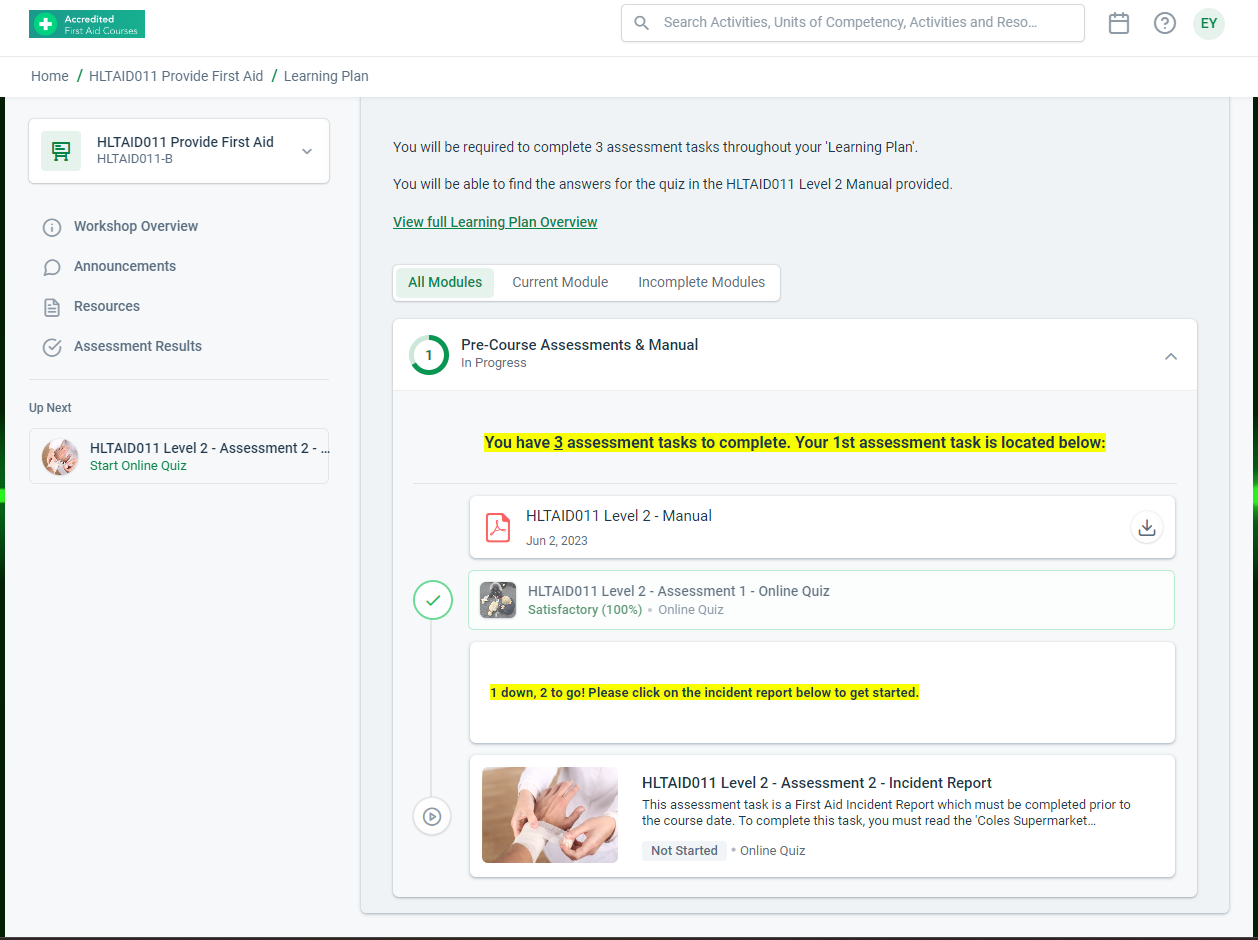
It would be so much easier if once you have finished Assessment 1, it takes you straight to the landing page of Assessment 2 - Incident Report, and not back to the landing page of the learning plan.
Again, this would not suit most RTO's, so having it in the prerequisites of settings would be beneficial for all.
-
Hey Matt,
I am out of potential helpful advice, lol.
Our layout is a little different where we have all the learning grouped and the assessments grouped.Our students didn't seem to get back to the LP, which may have actually slowed them down. They just clicked the up-next widget straight from the assessment overview and took off.
The other issue we had was that our observation checklists, do not need students to complete, but that was "up-next", so they needed to go back to the LP and choose the correct assessment. A lot more flexibility around the learning plans will be ideal (even down to formatting the content boxes, resources and assessment boxes smaller). :)
-

Hi Mark, my thought was that perhaps the SCORM, content item and resource item can be included in the auto next functionality. We can always add headers in the content item instead of using the heading item if we wish to use this setting. Even if it's just the content item we could include a URL link to a download instead of using the resources item, but having the resource item show would be the best option. I guess it'd be like it's own little slideshow. This would be great navigation for some students as they get mixed up with large Learning Plans. Thanks :)

Please sign in to leave a comment.
Comments
10 comments