Ability to send SMS and/or emails in bulk to short course workshops
Answered
We would like to be able to send SMS messages in bulk, a couple of days before a short course workshop, to remind participants of their upcoming course. Is this possible or something that could be addressed please? Thanks in advance.
-

Hi Alison, are you on Turbo? This is something you should be able to setup with the workflow engine. We currently have it setup for specific cohorts (using the course type) but can also be sent to all students.
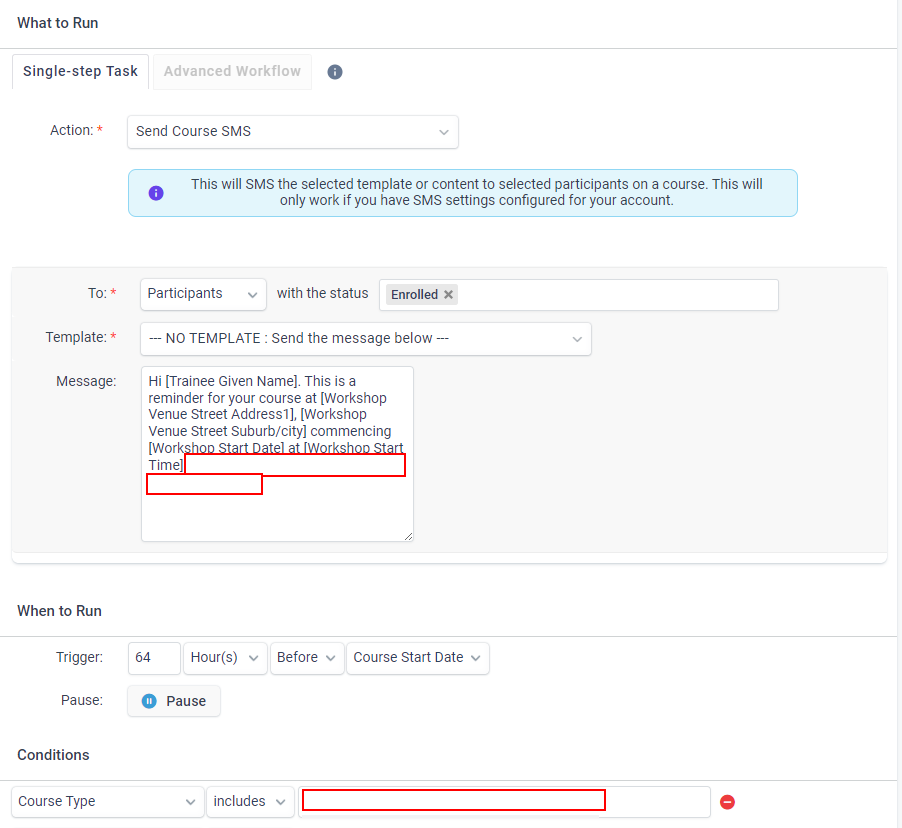
We do hours before the course to accommodate different time zones (ie. if the course states 8am start and we do 3 days, it will message students in WA 3 days before at 6am - using hours means they will all receive midday-early arvo).
-
Hi Alison, no worries.
From main screen, select Settings > Workflow. On that screen, select Automated tasks > New Automated Task. Choose an name/description for your purposes, this is purely reference for you so you know what the process does.
From the action box select Send Course SMS and for the rest you should be able to follow my screenshot above as a guide. As mentioned, you can set a few conditions/filter at the bottom. If you have a play around with it and still have any questions, I don't mind answering to the best of my ability.
All the best!

Please sign in to leave a comment.
Comments
6 comments