Allow inactive qualifications to be included in reports
Answered
It would be so helpful if we could have the option to include inactive qualifications in reports.
At the moment to report on inactive Qualifications you need to reactivate them.
This is a pain, especially if you wish to run reports on something like the previous BSB qualifications that were all superseded in 2020, there are so many to reactivate, only to pull the report and then need to deactivate them again.
For example, the Class Enrolments Report would be great if we could include previous qualifications.
-
Official comment

Hello Pip,
Please have a look at the filter 'Qualification is Inactive' and set this to 'Yes' in the Class Enrolments report this should assist you with this query.
Comment actions -
Hi Nicole, thanks for your response, I just tried this and I am still unable to select qualifications that are inactive as a filter on my report unless I am doing this wrong.

We don't need to filter if a qualification is active or inactive and get results for all active or inactive qualifications. I need to be able to filter based on specific qualifications regardless of whether they are active or not because usually, we are pulling these reports to get data for ASQA or contact students so having the option to select from inactive qualifications is important for these purposes.
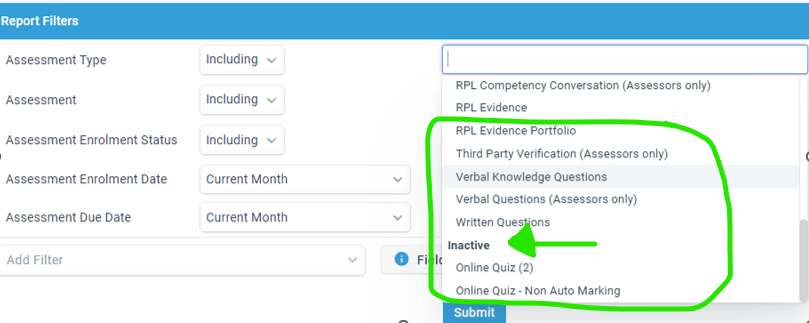
An example of how this would work best is if all qualifications are listed in the Qualification section and grouped by Active or Inactive so we can identify what is being selected. Like this
-
Hi Pip,
Currently, under the Qualification filter you are not able to see the inactive qualifications, you will have to remove this filter and keep the Qualification is Inactive filter this will then show you all information that relates to an inactive qualification/s. You can then use the designer, sorting or exporting options to easily find the qualification that you are looking for.
-
Hi Nicole,
Yes, I thought that was the case, thank you for the suggestion, if I need to report on only inactive qualifications I will remember this option. :)
For the reports that I often need to generate the 'Qualification is inactive' filter is not actually a better option than just going through and reactivating the qualification and then running the report on the specific qualifications that are needed because if you need data for specific current and recently superseded qualifications then using columns and sorting the exported data would actually take more work to narrow down on the specific qualification than just reactivating the qualification.
It is just limiting that to filter by qualification it has to be active, another limit with the 'qualification is inactive' filter is that you can't really use that to create report row event workflows to keep in touch with past students for specific qualifications.
Please sign in to leave a comment.
Comments
4 comments