Student Progress reports - Trainer comments

The current default Progress report, makes provision for the trainer comment on the student's profile and is not course specific. It means that the comments are overridden, with every progress report. The comments are currently added in the "Other Information" area of the student's profile.
It would be great if the system makes provision for course specific trainer comments, and gives option to add comments on e.g. a term basis.
-
Official comment

Hello Ronel and Bekky
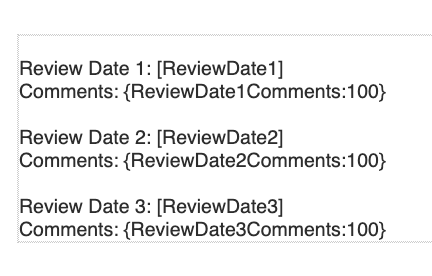
The best solution I would like to provide you with is to build a template that has Input Field where the trainers can generate the template to add comments to the template and send this to the stakeholders.
Below is an example of the Input Fields that you would add to your template. You can also set these templates up to be sent as a PDF attachment.
Please see this help guide to assist.
 Comment actions
 -

Yes this would assist immensely against our RTO as well. In particular in the VETiS space, where we are required to provide feedback to our school contacts on a term basis. Being able to track previous feedback is important to being able to track improvement and compare across multiple reports.
I see this would benefit most RTOs.
-
Hi Nicole, thanks for providing this feedback. I will discuss this with my team to identify if this is effecient. We have over 700 VETiS students, and our initial thought process was it would be more viable to send a report to each school with multiple students within report as opposed to an individual emails.
-
Hello Bekky and Ronal,
The other idea could be that you use Custom Fields on the enrolment page which will pull through to templates. You could have 2 or 3 custom fields setup for different review periods that are filled in and pulled into your templates to send. This will mean that the data is saved in the field in aXcelerate and can be pulled into reports as well if needed.
Please sign in to leave a comment.
Comments
5 comments