Allow trainer role to bulk email from workshops
Answered
Currently, Trainers can only email their students from a class group, however, to create efficiencies for trainers, the capability to bulk email from workshops would improve the experience. A class group may have 50 to 100 students within the class, however, a workshop may be for a selection of these students. Sending a session summary to each of the participants at the close of the session via email will be more efficient from the workshop than the class group.
-

Hi James
To add to Tom's response, if you give your trainers the Certificates and Templates - View permission, they will be able to send templates from Workshops.
You'll also need to configure which templates are approved for Trainers to use. You do this at the individual template level, by using the Trainer Approved checkbox.
Hopefully this helps.
-
Hi Tom and Mark,
thanks for the responses. Mailouts > General Emails & SMS is only exposed if you use an administrator role view, it is not available for a Trainer role view (see below). This role view exposes more than what a Trainer needs to be exposed to.
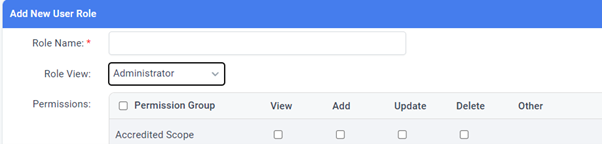
I also have templates exposed for trainers, however, these are not editable. We run flexible work-based delivery and as such need the capacity to send a customizable email at the end of each session to summarise the on-the-job and self-paced training students need to complete before their next workplace visit. I would do this from the class or individual student area, however, we facilitate to large clients that have several smaller groups all in the one class, so having the ease of sending straight from the workshops section is our best option. Just need aXcelerate to enable this for the trainer role view.
-
Hi James
Thanks for your response. Your reasons do make sense to me. One solution that you could implement now which wouldn't require any development work would be to create a generic Trainer template with custom text fields that Trainers can type into.
You can use the following code:
{Text:1000}
The number represents the character limit on the text box.
Using this method would provide the added benefit of giving you control over the branding of the email..
-
@Mark, any suggestions for removing the border of the text fields in the email that is sent?
have successfully created a template, however, the resulting email places a black border around the text and I would like to be able to remove this as the border is not a complete border if the text box is filled to the maximum character limits.
-

While the custom text field is a great workaround, I think there should by default have an option for trainers to bulk email workshop participants the same way that they can in classes. We have many courses with rolling enrolments and I don't like that I had to contact support and also search this forum for a solution.

Please sign in to leave a comment.
Comments
9 comments