When transferring learners between classes, default the learning plan modules and assessments to NO CHANGE instead of Enrol.

Hi, We often need to transfer students between classes.
When doing so if the new class has assessments or learning plan modules the student is not already enrolled in, the system will default to [Enrol] them in these missing items.
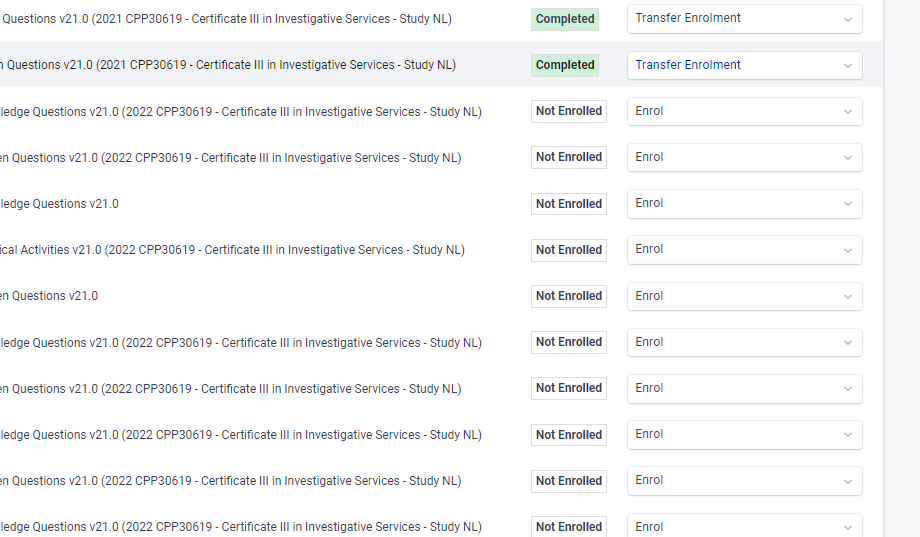
We never wish to enrol students in the missing elements while transferring them, so we have to go through each item and change it to [No Change].
I believe the default option should be changed to [No Change] as default because once I move a student I have many ways to quickly enrol them in all the missing items, but it is such a pain to have to try to remove items once a student is enrolled in them. There is the chance the wrong item will be deleted or the students might see the items and complain when they are removed.
So that is why I believe this would be a good thing to adjust.
-
Hi ax8, I'm gutted, you have changed the default behaviour for learning plan modules to be 'New Module Enrolment' now when transferring students between classes.

PLEASE PLEASE PLEASE PLEASE Change it so the default option is NO CHANGE.
Or give us a bulk option to toggle the option.
This is how many I have to manually change when transferring ongoing students from the 2022 class to the 2023 classes.
It takes soooooooooo many more clicks to remove the modules and assessments after you transfer them if you leave them as Enrol.
To enrol someone in assessments or learning plan options in bulk is soooooo much more simple, so it makes a lot more send to have the default behaviour be NO CHANGE.
From someone who uses the system to transfer enrolments please hear the feedback I am giving you.
This is how many I need to change per student....


Please sign in to leave a comment.
Comments
3 comments