Validation of self-marking assessments
Answered
I am struggling to understand how we are to validate self marking assessments.
As the validation screen only shows data from the latest attempt, it is basically not relevant after the 1st attempt occurs.
We are expected to validate assessments, but the only way i can see this is to go into each student and look through their re-attempts, this is much easier in paper format rather then via aX.
Can we update the marking screen to have the option to show the overall performance of the class, ie, which ones they got incorrect?
Can we also add this screen to the assessment authoring section for the total of all assessment attempts, then we can easily see what questions students struggle with, which may mean we need to change the question, or add more learning opportunities.
You can clearly see that while it says everyone got 100% they didn't the first time. 
And this is also not helpful, as we know students got questions wrong, but it displays as they are all correct. 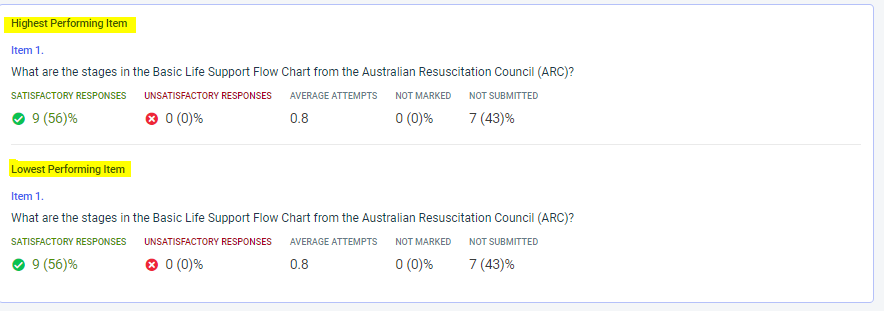
-

Hi Ash
Thank you for your post.
We're quite aware that this page isn't particularly useful once multiple attempts have been completed.
Creating much more detailed analytics is something we definitely want to do in the future, but just haven't got around to yet.
To be transparent, this is a bigger project, and likely not something we will have enough resources to consider for some months.
You can take a look at the big things we're currently working on here.
-

Good point about the attempts not really reflecting well on the overview, we need to see which questions students are getting wrong to see if there are issues with the question or the training that could be impacting it.
I would love to also see stats at an assessment level rather than an instance level.
We run courses fortnightly so there are too many instances that need to be compared which takes away a lot of the convenience of the overview.
-
Hey Karita.
If you go into the instance, click mark, and then click gather detailed assessment statistics before choosing a student.
It is only helpful if you allow students less than 100%, and it's per instance.We have created a student profile note for any override. We will add a note on a student file with the workshop code, assessment name, question number and reason for incorrect response. This allows us to run the report based on the note name, and filter through the overridden questions.
However, this is only after the second attempt, so not a true reflection of data.
aX has not yet provided any updates I am aware of. This would still be one of our major priorities.


Please sign in to leave a comment.
Comments
6 comments