Notification of failed emails

Starting a new post as the last one has comments closed.
At the moment, it's a bit concerning the information we get when an email bounces.
Looking at the notification center, the detail provided is insufficient for identifying what email has bounced. This is a huge problem, especially where you're sending a bulk email.
As an example, this is the info I've received on a recent one: "Template email batch submitted at 10:13 AM has failed. No emails sent. smtp.office365.com 554 5.2.0 STOREDRV.Submission.Exception" - I honestly don't know who it's for.
Am I approaching this wrong, and there is a way to identify bounced emails and who they were intended for?
If not, I would think it important to improve this area.
-

We had this happen when we were changing from using the default SMTP server settings to our custom settings for "ourdomain.com". There's a few settings that have to be perfect for this to work (please note, our email is via office365 so these tips won't apply other SMTP providers)
So via Settings > System Settings > Web & Other Integrations
Scroll down to Outgoing Mail Settings
Under Mail Server Settings we changed from aXcelerate mail server to Custom mail server
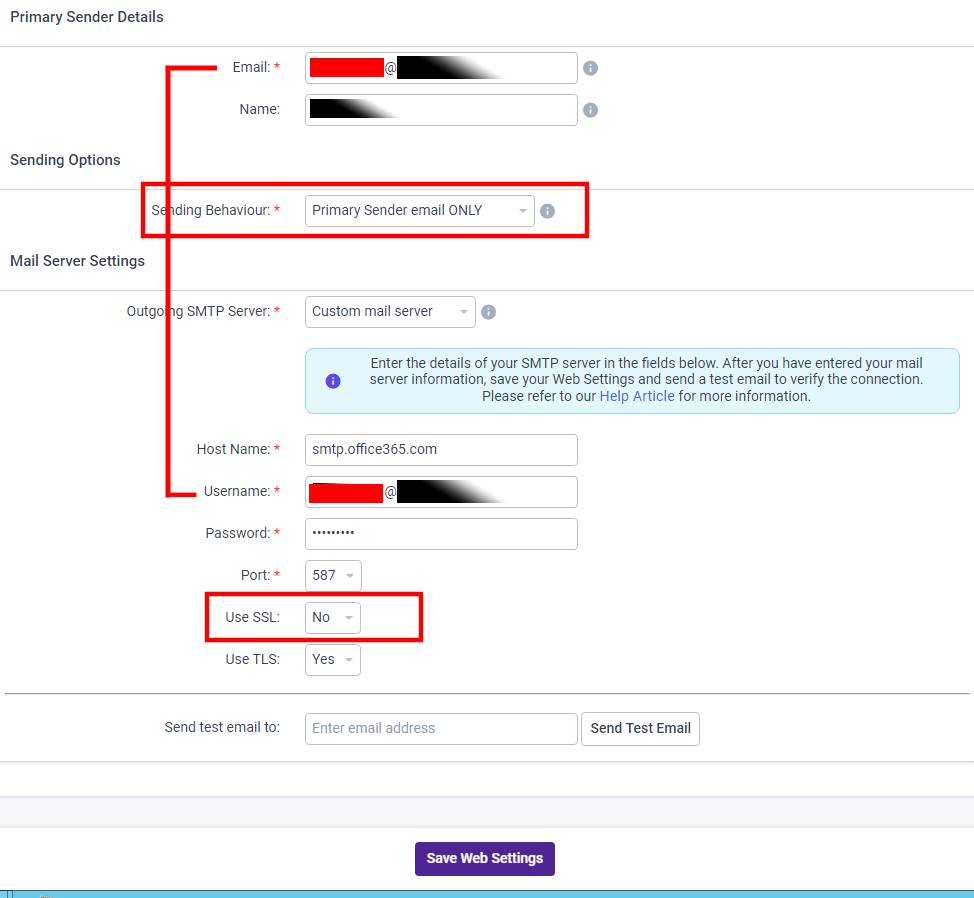
- For Office365 the Host Name is smtp.office365.com
- The Username has to match the email used in the Primary Sender Details
- Use SSL had to switched OFF
Under Sending Options, Sending Behaviour has to be Primary Sender email ONLY
The image below highlights all the important areas that worked for us in an Office365 environment.
FWIW - you MUST change from the default "aXcelerate mail server" to "Custom mail server" or all your emails will be treated as SPAM (in technical terms they will immediately fail the SPF test and that means they are spam). If you do continue to use aXcelerate as the mail server you will need to make a new TXT SPF entry to your DNS - which is a different thing all together.

Please sign in to leave a comment.
Comments
2 comments