Build on Attempts
Answered
Improve the functionality of "build on attempts" feature for Online Quiz asssessment types:
Currently the feature allows the user to view their results - user can see which questions they got correct and which ones they got incorrect... But this means they have to click through so many times to resubmit - they should only be asked the questions they got incorrect!
-
Official comment

Hi Stuart and Sylwia
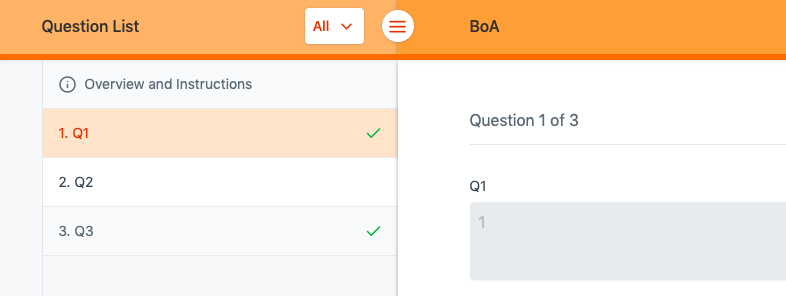
Students should be able to use the question selector on the left hand side to quickly jump between questions.
 Comment actions
 -
Hey mark
Thanks for your response.. Yes - we were aware of the question tool on the right. We were just hoping to reduce the number of clicks for a student to experience to complete their assessments and also to reduce any (potential) confusion aroudn which q's they get wrong.... even though it's pretty obvious in the question selector with a 'tick' or X
Cheers
Stu
-
Hi Stuart
Thanks for your prompt response. Do you have any suggestions on how to reduce the number of clicks for students in this scenario?
Currently, students may answer a question, click "Save", and then click on the next unsatisfactory question in the side panel (2 clicks).
If students are able to answer a question, click "Save", and then click "Next" to take them to the next unsatisfactory question, that is still 2 clicks.
Note that I failed to mention that students may also use the dropdown at the top of the page (seen in my above image) to filter unanswered questions, which should make jumping between questions easier.
We are in discussions about changing the Save/Next button to be a "Save and Next" button, and introducing auto-save; however this has not yet been confirmed.
I'd love to hear your feedback on the above.

Please sign in to leave a comment.
Comments
4 comments