NEW Client Portal - Enrolment Date Cutoff Issue

The new client portal initially looked great, however, we have realised that our clients cannot use it to enrol their staff into online training courses/classes (that is, those that are set up to accept enrolments any time during the year) due to an enrolment cut-off date that is applied and which is not in line with how the rest of aX enrolments work (including online enrolments via an RTO's website). See pic below of the Enrolment Cutoff date showing in the Client Portal, but which does not show 9or apply) if the Client enrols online via our website (online enrolments):
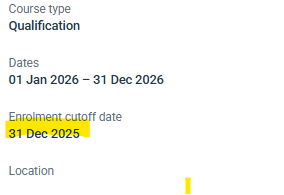
For some odd reason, the Client Portal automatically applies an enrolment cutoff date which is set to be one day before the class Start Date. This is unworkable for RTOs that have been shown by aX how to set up Classes for online short courses where students can enrol any time between the Class Start and End dates.(i.e. the usual enrolment cut-off date would be the Class End Date)
To clarify further: If a 2026 Class is set up for, say, an 8-week online course, where students can enrol at any time throughout the year, the Class would likely be set to have a Start Date of 1st Jan 2026 and an End Date of 31 Dec 2026. The duration may state 8 weeks and, IMPORTANTLY, the tick box that says 'Scheduled activity start and end dates apply to all Participants' will NOT be ticked.

Under the units of competency for the Class, the RTO would click the Timetable button and in Simple View, set an 8 week start and end date for the unit/s e.g. 1st Jan 2026 - 26th Feb 2026, making sure NOT to tick the 'Timetable after saving dates' box: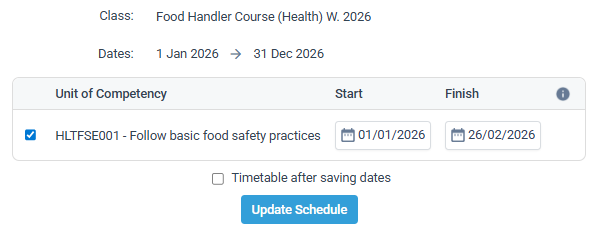
This set up allows participants to be enrolled at any time throughout the 2026 calendar year; that is, their enrolment start date is automatically set as the date they enrolled and their enrolment end date is automatically set for 8 weeks later. Works perfectly everywhere in aX (manual enrolments by administrator or online enrolments via RTO website), but not via the Client Portal.
For some odd and frustrating reason, the Client Portal seems to be set-up only for classes where the Class Start and End dates apply to all participants and so it will not allow enrolments any time after the Class Start Date. For RTOs that have clients who wish to enrol their staff into online courses at any time through the year, this configuration in the Client Portal is completely unworkable.
PLEASE fix so that the Client Portal enrolments work the same way as everywhere else in aX.
-
Official comment

Hi Melinda,
Thanks for reaching out about this – it's quite timely. We're looking into standardising the enrolment rules across aXcelerate, and supporting this via the client portal.
We'll keep you updated!
Brendan
Comment actions -
Much appreciated Brendan. Is this likely to be addressed in the next month as am holding off /postponing meetings with clients who I intended to give access to/show the client portal to. Having said that, one client really wanted access, so I figured out a workaround after posting yesterday. I added -365 into the Close Days box, which changed the cutoff date to the Class End Date (i.e 365 days after the Class Start date). A warning to anyone reading this and wanting to try it: this workaround works well for the new Client Portal HOWEVER if those same classes are also showing on your website for online enrolments, they will disappear.
-

The current hidden settings are proving challenging to work with. We’re having difficulty preventing certain classes from displaying on the website while still allowing private students to be manually enrolled. Previously, we relied on the Close Days setting, but this now also blocks manual enrolments, which isn’t ideal.
It would be much more effective to have class-level settings that independently control website visibility, manual enrolments, and enrolment cut-off dates. Separating these controls would allow better flexibility—for example, avoiding situations like the one Melinda is experiencing, where the system automatically applies restrictions that should be optional or configurable.
Please sign in to leave a comment.
Comments
3 comments