Help Requests: Enhanced trainer selection + customisable categories, subcategories, user routing, and priority settings

Under the current Learner Help Requests feature, when “Set default Assignee to be Learner’s Trainer” is enabled, two limitations affect how we manage internal workflows and how learners receive support.
1) Trainer Selection: Allow learners to choose all assessors assigned to a class
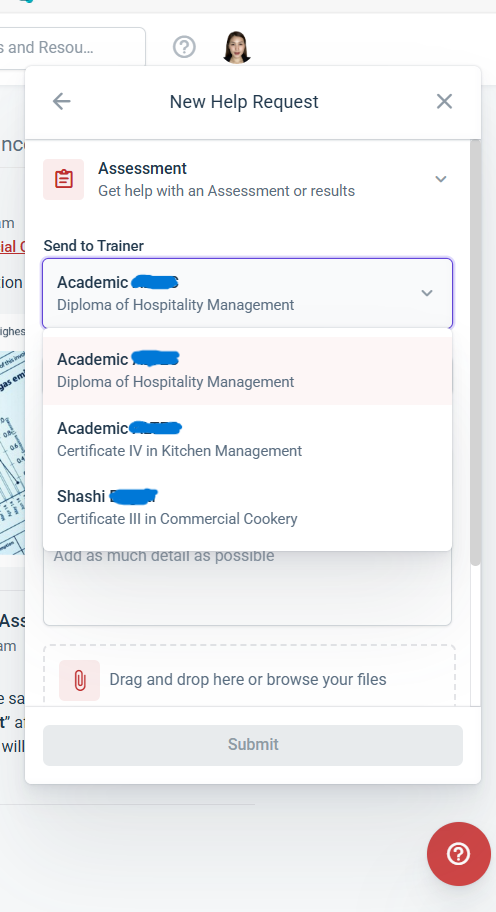
When students initiate a Help Request, the trainer dropdown only shows the default class trainer, even though many classes have multiple trainers/assessors responsible for different units or workshops.
Suggestion:
Extend the dropdown so that it displays all trainers/assessors associated with that class, not just the primary/default trainer.
This allows learners to send their request directly to the correct assessor.
Benefits:
• Reduces internal reassignment workload and support delays
• Ensures accurate routing for classes with multiple trainers
• Allows learners to select the trainer actually responsible for their unit/assessment
• Keeps existing auto-assignment logic but adds necessary flexibility
2) Category Customisation: Add/modify/delete categories, subcategories, user routing, and priorities
Currently, Help Requests only provide four fixed categories:
General, Learning Materials, Assessment, Your Enrolment Details.
These cannot be customised, expanded, or routed to specific internal teams.
Suggested Requirements:
a) Custom Categories & Subcategories
Allow us to:
• Add new categories
• Modify existing categories
• Remove categories not used
• Add custom subcategories
Example for Your Enrolment Details: Fees / Dates / Status / COE / Visa Evidence.
b) Assign Specific Users or Teams Based on (Sub)Category
E.g.:
• Fees → Accounts Team
• Learning Materials → Academic Team
• Assessment queries → Assigned trainer/assessor
This eliminates misrouted tickets and speeds up response times.
c) Category-Based Priority Settings
Predefine priority levels (Low/Medium/High) based on category or subcategory.
d) Optional Configurable Fields
Ability to mention links to request specific documents, or ask learners to upload files relevant to the category.
e) Add Help Requests to Reports & Workflows
- Workflow triggers: reminders/escalations if a request is not actioned within certain time
- Reports: tracking unresolved items, team response times, escalations, and anybottlenecks
Benefits:
• Better alignment with each organizations internal structure
• Accurate routing to the correct departments
• Reduced reassignment workload
• Improved service levels and accountability
• Better reporting for compliance and escalation
Snips for Reference:
1. Learner initiating Help Request
2. Classes showing multiple assigned additional trainers/assessors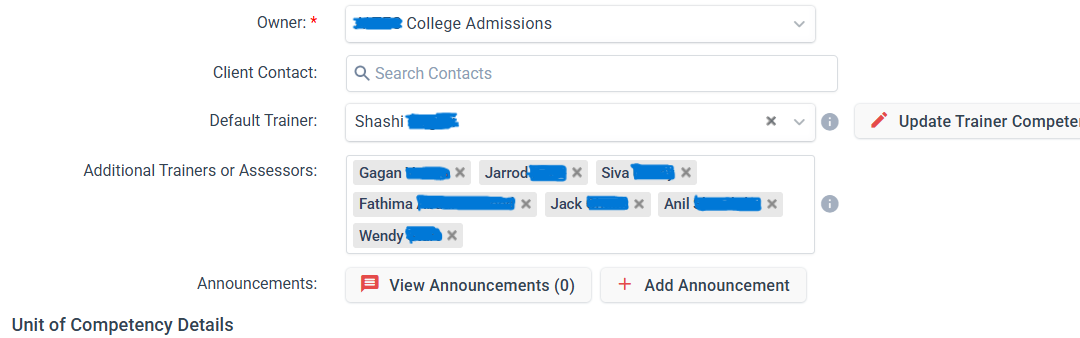
Thanks,
Naji
Please sign in to leave a comment.
Comments
0 comments