Student selecting 'I Understand' before commencing assessment (the same as Cloud Assess)
Answered
On another LMS, student's needed to select 'I understand' to the following statement before being able to commence an assessment.
"Do you understand the instructions? By clicking "I understand" you acknowledge that you have read and understood the information provided."
At the moment in axc, we have replicated this as the first question of each assessment which really isn't ideal.
-
Official comment

Hi Mason,
Thank you for your feedback!
Adding a student declaration to your assessments may assist with this one. Upon submission of their Assessment, students will be shown the accompanying 'Student Declaration Text' and will be required to add their signature.
Further information can be found in our Assessment types help guide here.
Thanks,
MadiComment actions -
Hi Madi,
Thanks for getting back to me.
I'm aware of the student declaration, but as you mentioned, this only appears upon submission of their assessment. What we’re looking at is something that displays when the student starts their assessment — for example, when they select “Start Attempt 1 of #”.
Ideally, a popup would appear with a message like the one below, and only open the assessment once the student selects “I understand”:
"Do you understand the instructions? By clicking "I understand" you acknowledge that you have read and understood the information provided."
-

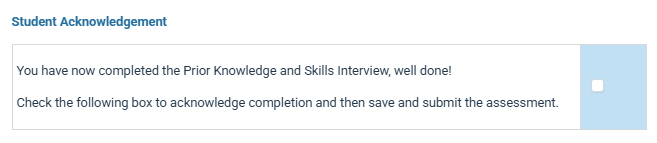
Hi Mason, could you possibly create a question page at the start of all your assessments that could serve this purpose, so that it is documented within each assessment?
Possibly, a pop-up may not record the acknowledgement, so maybe customising a question to have the students read and acknowledge, then select 'I agree' could better meet your needs.
Example of what I mean, even though this one is at the end.
Please sign in to leave a comment.
Comments
3 comments