Learner Onboarding - more customisability
Answered
We have been playing with the new Learner Onboarding feature, but find the form builder to lack some basic features that we'd really love to see.
Of particular note:
- Formatting of text in the Description of each field - e.g. bold, underline
- Ability to add URLs or pop-ups/overlays - e.g. linking to a privacy policy or disability supplement that provides more lengthy info in a pop-up box or external page
- Ability to add non-field content - e.g. a text box with additional instructional information, or an image showing an example ID
- Simplification of Address entry - e.g. 'Is Postal Address the same as Residential?' shortcut, Australia Post address suggestions.
- More control over the question presentation itself - e.g. field currently labelled 'Indigenous Status' but we might prefer to word as 'Are you of Aboriginal or Torres Strait Islander origin?' (without having to create a new section and use the description to elaborate instead)
-
Official comment

Hi Elizabeth,
Thanks for your great feedback about our new Learner Onboarding feature. It's so great to see reflections, feature requests and opinions coming through so we can continue to evolve and improve this new feature.
- More customisation and specific content blocks are something we'd love to add to to our form builder soon, this will solve your first 3 requests. You may have noticed we've added clickable URL links since the first release of Learner Onboarding too.
- Australia Post suggestion for address lookup is a great request - I'll add your name to our existing idea fore this one top bump it up.
- For customising field titles and wording, we have used standard formatting from AVETMISS etc for this to keep forms consistent. - thanks for the feedback specifically on the at school field, we're keen to ensure field options are easy to comprehend for learners too.
- Really valuable feedback for how our initial version of portfolio items work in the form builder - we will keep this in mind as we evolve the feature
Thanks again
Shannon (LMS Product Manager)
Comment actions -
Just a couple more thoughts, now we've played with this even more.
Continuation of 5: Further examples of fields we'd like to customise the default presentation of:- USI: Instructions give a link to Create, but do not mention how to Find
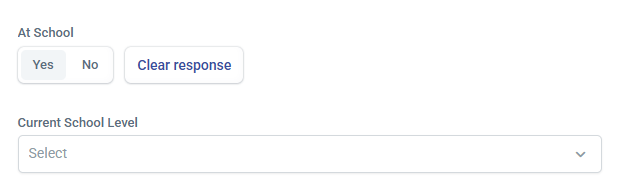
- At School: 'At School' might be the AVETMISS flag, but isn't a good way to present the field to a student. The standard format of this question is 'Are you still enrolled in secondary or senior secondary education?'. As this is generally grouped with 'Highest School Level Completed' field, it's something we'd prefer not to need a dedicated section/description for.
6: Portfolio Items:
- Not able to control which sub-fields are shown to the student, e.g. can't choose to hide 'Issued by'.
- Unintuitive for returning students, where an upload already exists. e.g. doesn't show that an expired ID should be replaced, or that no upload is required as the current one is already there.
-

When we first started using the Onboarding Form (in its infancy) we were able to insert our Privacy Notice which was quite long. Now when having to edit it, we are restricted by a limit of characters! This now renders our Privacy Notice useless as it only shows half the information to have signed by the student. We will now have to insert a link to a document for the student to open and read, which we know they won't! NOT HAPPY JAN!


Please sign in to leave a comment.
Comments
7 comments